Showing posts with label Project Server 2010. Show all posts

Tuesday, January 18, 2011

Meet Remaining Work - Your New Best Friend!

I have had a lot of customers ask me about Tasks and their behavior on Timesheets in Microsoft Project Server. So before you go and log that 'bug' report or help desk ticket, here is a general summary of behavior:

  • You can begin any task early by adding it to your Timesheet - note: this assumes that your server is configured with certain permissions for timesheet users. Project Server does not prevent you from starting any task early.
  • If a task extends beyond the planned 'End' date, the task will still appear on the Timesheet. Just because the planned or estimated completion date has passed does not mean that the task is completed. DATE does not determine task completion in project server when you are recording Actual Hours and Remaining Work.
What does make the Task complete then? How do I tell project that I have finished the task?
  • If you have completed a Task, either before, on or passed the estimated completion date, you should update the Remaining Work column.
Meet the 'Remaining Work' column, your new best friend! If you are a Project Manager, you must update Rem Work in order to properly update the actual completeness of the task. This tells project whether the task has completed within the estimated work and duration i.e. we finished it early or we finished it late or we finished it late, but only used 6 out of the 8 hours. This is all dependent on the original estimates being baselined.

If you are a Resource and using the Timesheet, then your Administrators should have made the 'Rem Work' column available to you to update on your Timesheet. You can do this for each task and submit it to the Project Manager, along with your acutals.

Project Managers should consistently be asking their team 'how much work is left on that task? Are you done yet?' This is the only way to accurately project true effort on tasks and projects.

If your projects are not effort-driven, then you are doing duration-based planning. However, I will strongly argue against using that as a model for resource forecasting because it doesn't allow a full or precise picture of resource allocation and demand.

I hope that this helps clear up any ambiguity to tasks on the timesheet and how to update or show tasks completed early or tasks that will need additional time.

Oh, and one final thing: PMs - please remember that the 'Work' column is only a summary of the 'Actual Work' + 'Rem Work' columns.

WORK = ACTUAL WORK + REMAINING WORK

You should NEVER update the Work column if you are using Timesheet actuals in Project Server. You would be overwriting resource actuals, which compromises data integrity. The only column you should be updating is the 'Rem Work' column.

Friday, July 16, 2010

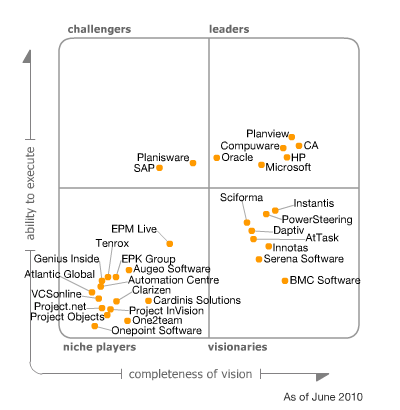
Microsoft a Leader in Gartner 2010 Magic Quadrant


As a person who has experience with many Enterprise Project Management (EPM) tools, I am always interested to read what Gartner has to say about the pros and cons of the leaders in its 'Magic Quadrant.' I'll leave it up to you to decide how much importance there is in these studies, but below is an excerpt from this year's summary on Microsoft's 2010 EPM tool:

Strengths
  • The 2010 version of EPM is built on Microsoft SharePoint Server, providing support and inclusion of SharePoint's business collaboration capabilities, a common user interface, data integration, search functions, and reporting infrastructures.
  • The 2010 version of EPM combines Microsoft's portfolio management capabilities and its centralized project management features (previously in two separate but integrated products) into a single, unified product with a common repository and data flow.
  • The 2010 release of EPM adds support for managing projects and work requests during the demand collection, proposal, business case generation, and approval/rejection phases of a typical project life cycle.
Cautions
  • Currently, Microsoft only offers a SaaS version of EPM through its network of certified EPM hosting partners.
  • Microsoft EPM provides limited preconfigured reports and dashboards. Users will need to create and modify their own reports using Excel and Excel Services, the added Report Wizard, or the PerformancePoint Dashboard Designer. Alternatively, more-advanced reports can also be developed using SQL Reporting Services, which generally require a skilled IT resource.
  • Microsoft EPM does not yet provide strong, out-of-the-box "budget versus actuals" reporting at the portfolio level, but customers can meet these requirements with custom fields, by extending Excel Services integration or with a number of existing add-on modules available from the Microsoft partner network. In addition, EPM provides integration and bridges to third-party financial management systems.


Read the full report here

Wednesday, July 14, 2010

Solution Starters for Project Server 2010

Great news EPM gurus! Microsoft has released a series of Solution Starters for Project Server 2010. Take a look at the great features here and see if these can help you or your customers!

Tuesday, May 4, 2010

All of Office 2010 - including servers -released on MSDN

Those of you using MSDN will be pleasantly surprised to find that
Microsoft Office 2010, including Project, Project Server, SharePoint and Office Professional Plus, have all been released for download. These are not the betas but the actual production-ready images.